Product ID: HS-PICOLAB-001
Android & iOSPicoLab
Build circuits. Explore electronics. Learn by doing.
An interactive electronics workbench for Raspberry Pi Pico
Explore how electronic circuits work using a virtual breadboard, interactive components, circuit simulation and MicroPython programming.
PicoLab brings circuit building, programming and guided experiments into one workspace, helping you understand how components connect, how circuits behave and what happens when something goes wrong.
Whether you're learning electronics for the first time or experimenting with a new idea, PicoLab provides a practical place to explore before building with physical hardware.
Find PicoLab on Google Play and the Apple App Store. Availability, device compatibility and features depend on the platform and release.
Inside the application
Explore the workspace
Actual screenshots from the PicoLab web preview.
The web preview illustrates circuit building and code. Running supported MicroPython programmes uses the Android application’s embedded interpreter. These images show the web interface, rather than the Android build.
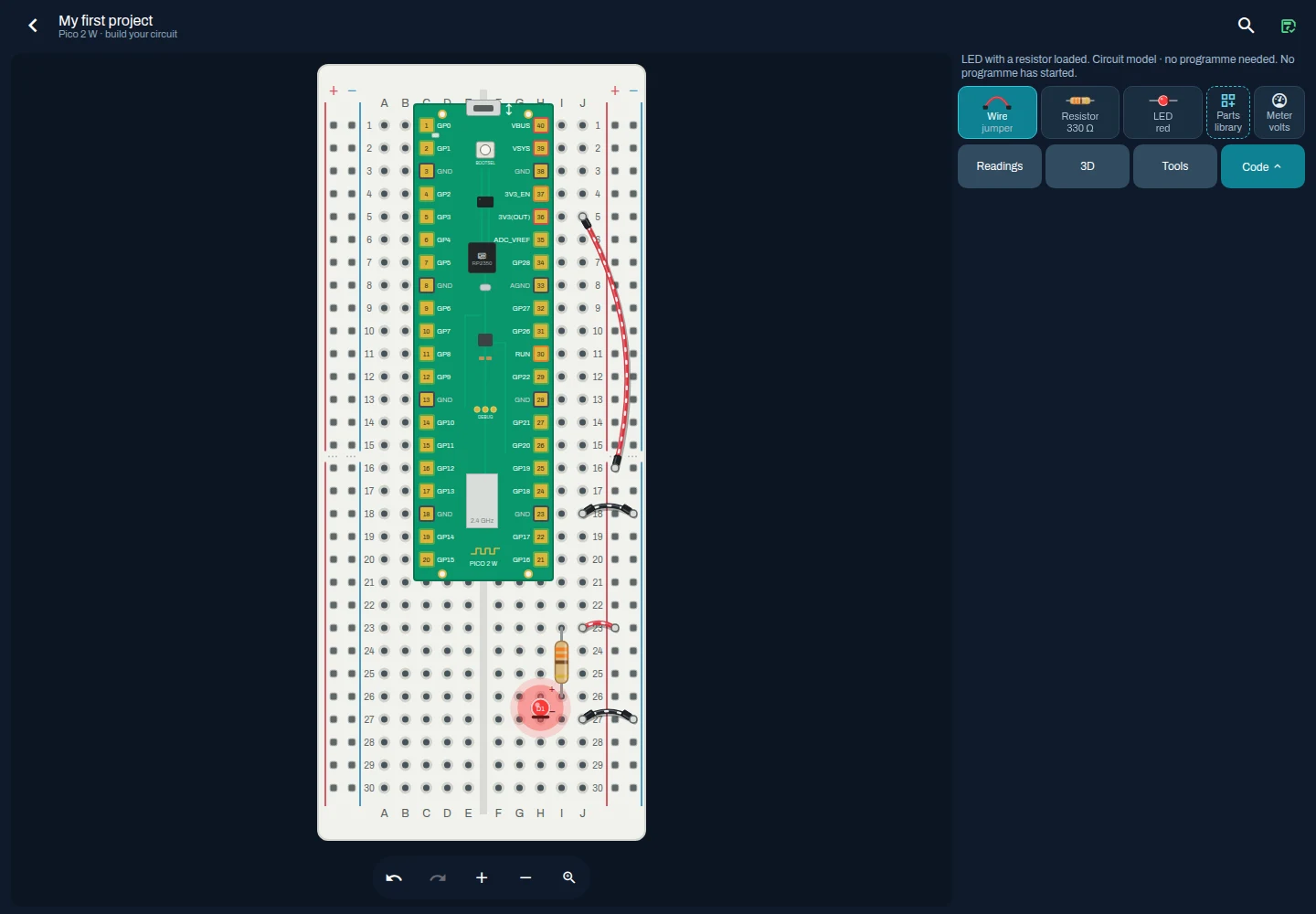
Build a circuit with a Pico, resistor, LED and jumper wires.
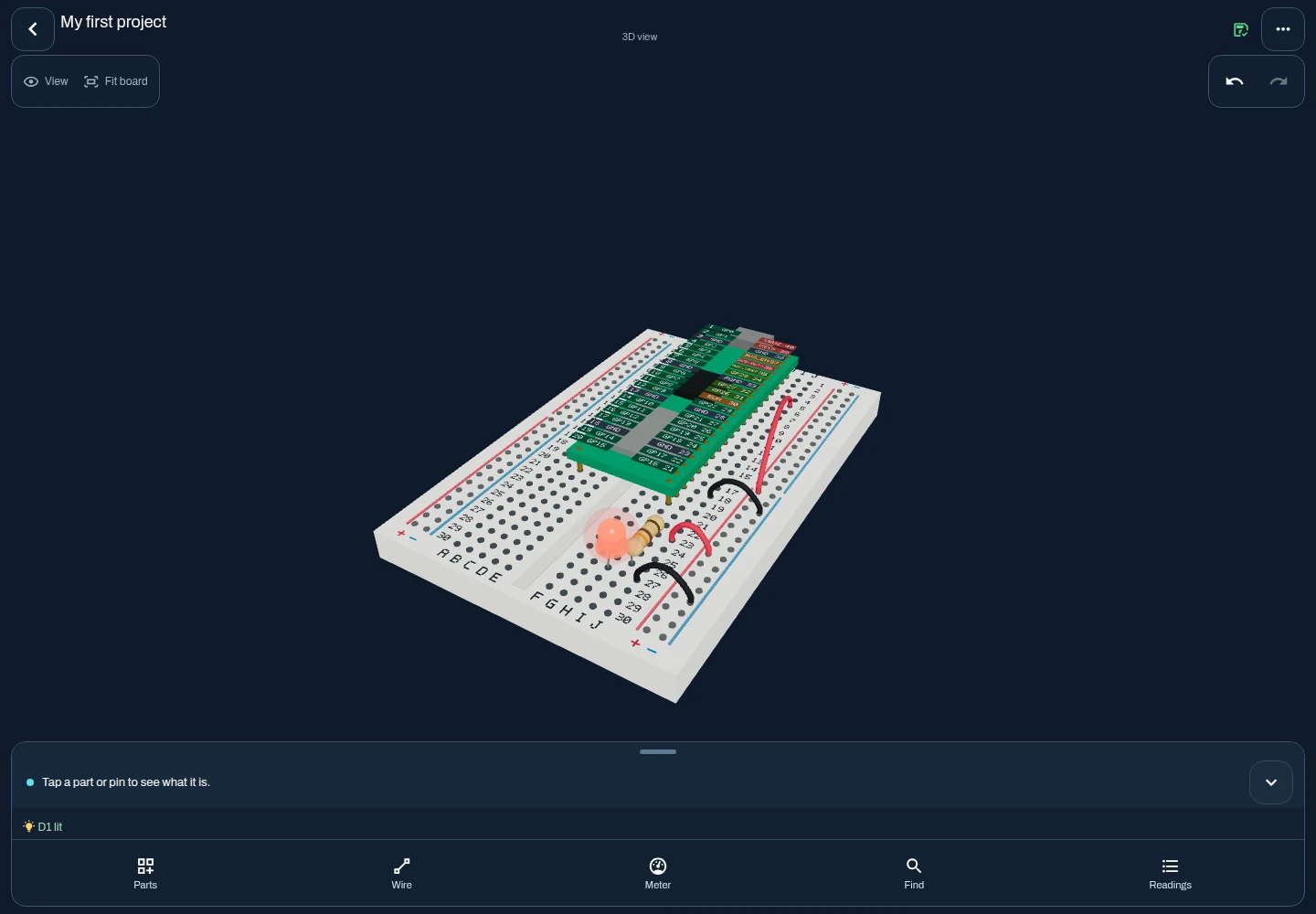
Explore the same circuit in the interactive 3D bench.
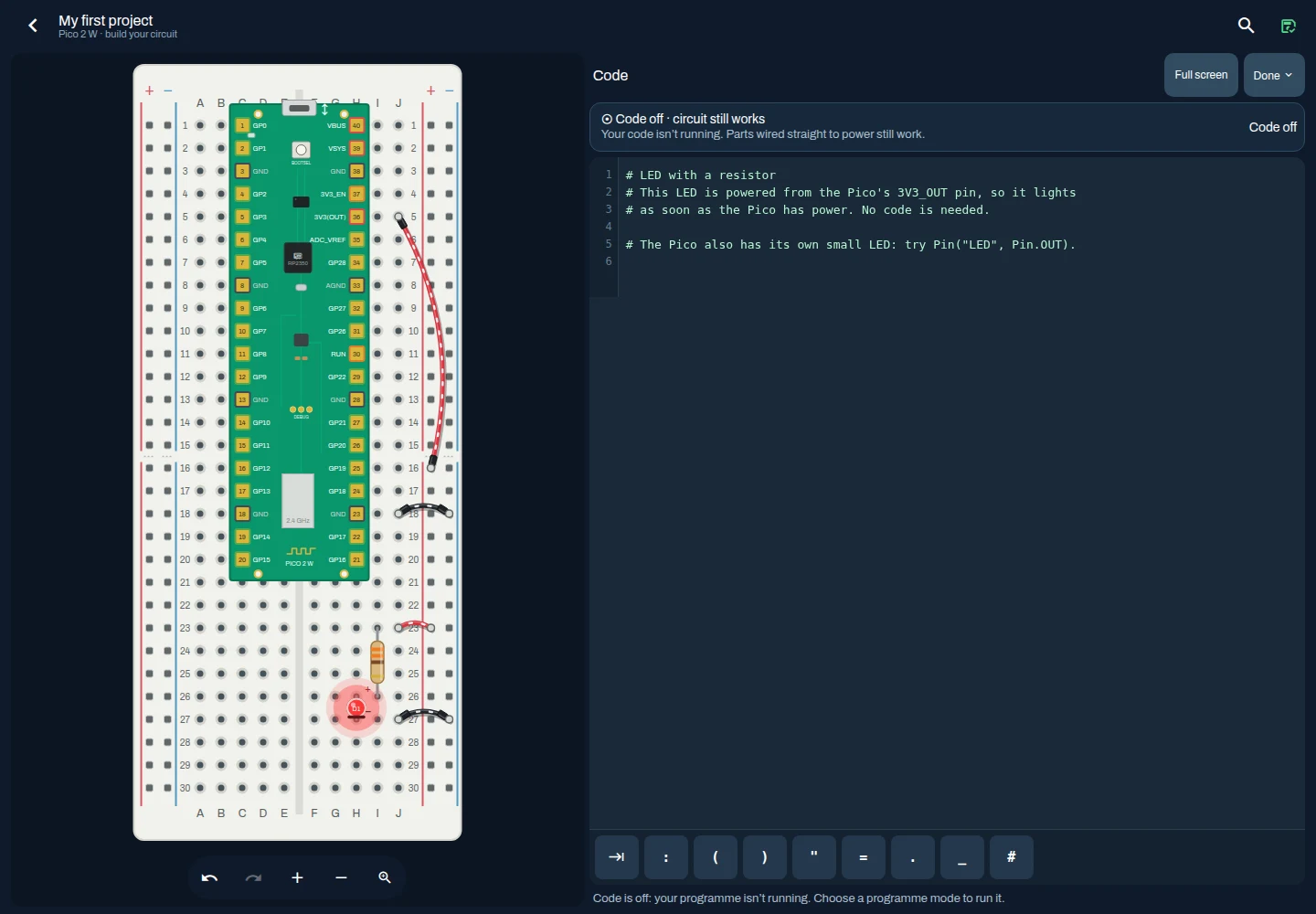
Inspect and edit MicroPython source. The web preview does not execute MicroPython.
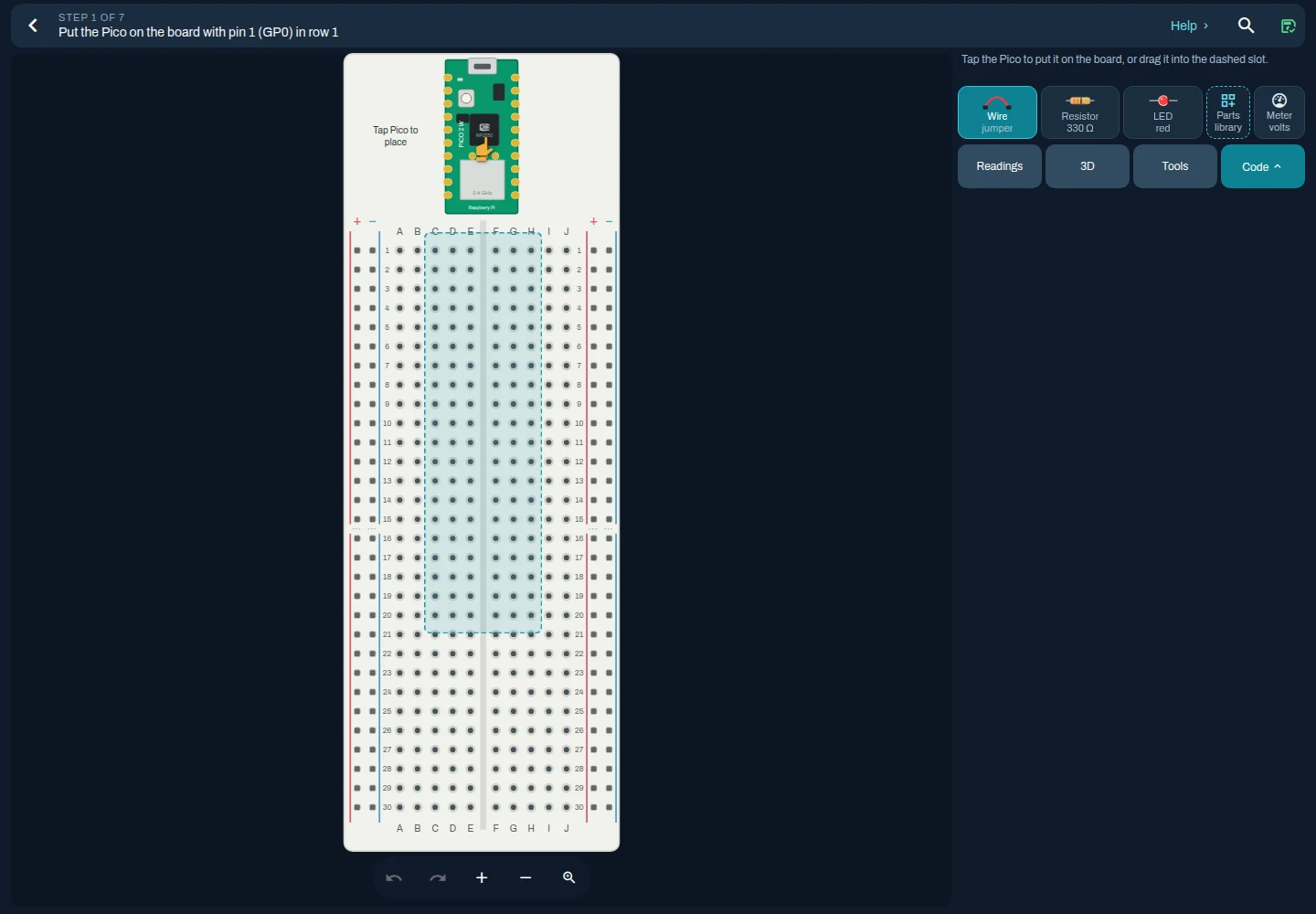
Follow a circuit-building activity step by step.
Learn electronics by building circuits
Understanding electronics becomes easier when you can experiment with the connections yourself.
PicoLab provides a virtual Raspberry Pi Pico 2 W and breadboard, allowing you to assemble circuits, connect components and explore their behaviour.
Start with a simple LED circuit, investigate how a resistor affects current or experiment with a programme that controls an output.
As you build, PicoLab helps you understand the relationship between your wiring, the components you've chosen and the results you observe.
What can you do with PicoLab?
Build circuits on a virtual breadboard
Place components, connect jumper wires and explore how the Raspberry Pi Pico interacts with an electronic circuit.
Explore circuit behaviour
Inspect approximate electrical values, observe supported component behaviour and investigate how changes to a circuit affect its operation.
Experiment with MicroPython
Write and run supported MicroPython programmes using the Android application's embedded interpreter. Explore GPIO outputs, PWM and supported input interactions.
Learn through guided experiments
Follow structured activities that introduce circuit assembly, programming and common electronics concepts.
Find and understand wiring mistakes
Investigate open circuits, reversed LEDs, excessive current and other supported fault conditions, with explanations to help you understand the problem.
Save and revisit your projects
Create and organise circuit projects, duplicate experiments and import or export supported project files.
A complete workspace for experimenting with the Raspberry Pi Pico
Build and connect
PicoLab includes an interactive breadboard model with a Raspberry Pi Pico 2 W, numbered pins, electrical connections and a selection of electronic components.
Arrange your circuit, add wires and explore the connections between components.
The workspace supports component placement and editing through interactive controls, including ways to select and position components without relying entirely on precise dragging.
Explore circuits in 2D and 3D
Work with a conventional 2D breadboard layout or explore a three-dimensional representation of your circuit.
Both views use the same underlying circuit model, so your components, connections and electrical state remain consistent.
The 3D workspace continues to undergo device performance and usability testing. Check the current release for platform-specific feature support.
See what your circuit is doing
PicoLab uses an educational electrical simulation model to calculate supported circuit behaviour.
Depending on the circuit, you can explore:
- Electrical connectivity and power paths
- Approximate voltages, currents and component power
- LED behaviour
- GPIO and PWM effects
- Supported wiring faults
The simulation is designed to support learning. Its calculations are approximations and should not be treated as a substitute for physical measurements, component datasheets or professional circuit simulation software.
Bring your circuits to life with MicroPython
Programming is an important part of working with the Raspberry Pi Pico.
PicoLab connects programming experiments with the circuit you've assembled, so you can explore how code affects electronic components.
Three ways to experiment
MicroPython execution
On supported Android builds, PicoLab includes an embedded MicroPython interpreter that runs supported programmes against the virtual circuit.
Explore digital GPIO, PWM outputs and supported button input behaviour. Run, stop and reset your programme, and inspect available console output and errors.
Code preview
Explore illustrations of recognised code patterns without executing Python.
This mode helps demonstrate supported behaviours, but does not verify that a programme would execute successfully.
Circuit only
Explore powered electrical circuits without programme-driven effects.
This mode is useful for investigating connectivity, power and basic component behaviour.
Understanding the limitations
PicoLab does not reproduce every capability of a physical Raspberry Pi Pico.
The current Android runtime supports selected MicroPython functions. Peripheral support, including ADC, I2C and NeoPixel, remains incomplete.
The web version offers circuit simulation and code illustration, but does not execute genuine MicroPython.
Start with an experiment
New to electronics? PicoLab includes guided activities designed to introduce circuit building and programming through practical tasks.
Light an LED
Explore how a basic LED circuit works.
Connect the necessary components, investigate the role of a resistor and observe what happens when the circuit is powered.
Make an LED blink
Connect circuit assembly with programming.
Explore how a GPIO output can switch an LED on and off, and how timing affects the result.
Experiment with PWM
Investigate pulse-width modulation through supported LED and piezo experiments.
Explore how changing an output can affect the behaviour of connected components.
Understand what went wrong
Learn from common circuit problems.
Investigate missing connections, reversed components and unsupported or potentially damaging electrical conditions.
PicoLab provides feedback to explain supported faults and help you identify what to change.
Available experiments and programme execution depend on the application build and supported capabilities.
Keep your experiments organised
Circuit experiments often develop over time. PicoLab provides tools to preserve your work and return to previous ideas.
You can create projects, rename and duplicate them, save circuit arrangements and export editable project data.
Supported projects can also be imported, including selected circuit structures from KiCad XML netlists.
The application includes recovery features for deleted projects and certain storage problems, helping protect work during experimentation.
Core circuit-building and learning activities are designed to work offline.
Who is PicoLab for?
Electronics beginners
Learn the fundamentals of connecting components, understanding circuits and working with a Raspberry Pi Pico.
Raspberry Pi enthusiasts
Experiment with circuit ideas, explore pin functions and try supported MicroPython programmes in a virtual environment.
Makers and hobbyists
Develop and investigate circuit arrangements before moving to physical components.
Educators and STEM learning
Explore the potential of guided circuit activities for teaching introductory electronics and programming concepts.
PicoLab is being developed primarily around individual learning. Classroom suitability and wider educational deployment have not yet been formally validated.
Designed around practical learning
PicoLab is developed by HelixScribe, an independent technology company creating applications around practical problems.
The project explores how interactive software can help people learn electronics through experimentation.
Its development combines a physical breadboard model, electrical simulation, programming tools and guided learning activities.
The underlying circuit state is maintained independently of the visual interface. This helps the 2D and 3D workspaces represent the same connections and electrical behaviour.
The development process also includes automated testing, documented simulation limitations and ongoing work on accessibility, recovery and device compatibility.
Availability and development
Get PicoLab for Android and iOS
PicoLab is listed on Google Play and the Apple App Store.
Use the store listing for your device to check the current release, compatibility requirements, pricing and available features.
Ongoing development
Development continues around circuit-building, guided learning, simulation, accessibility and project preservation.
Platform-specific capabilities, including supported MicroPython functionality, may differ between builds. The web preview offers circuit simulation and code illustration, rather than genuine MicroPython execution.
PicoLab is an educational application, rather than a verified engineering simulation tool.
Export a project backup before installing an updated build.
Frequently asked questions
What is PicoLab?
PicoLab is an interactive electronics learning application built around the Raspberry Pi Pico 2 W. It combines virtual breadboard assembly, electrical simulation, supported MicroPython programming and guided activities.
Do I need a physical Raspberry Pi Pico?
No. The virtual workspace allows you to explore supported circuits and programming behaviour without connecting a physical Pico.
Can PicoLab run real MicroPython?
Supported Android builds include a genuine embedded MicroPython interpreter. The simulated hardware interfaces implement a selected subset of Pico functionality, so compatibility with physical hardware is not complete.
Does PicoLab work offline?
Core circuit-building, programming and learning functions are designed to work offline on supported Android builds.
Can PicoLab simulate electrical faults?
Yes, within its supported educational electrical model. PicoLab can identify and explain several common circuit problems. It does not provide complete electrical safety analysis, validated physical damage modelling or full SPICE simulation.
Is PicoLab available on iPhone?
Yes. PicoLab has an Apple App Store listing. Use the App Store button on this page to check availability and compatibility for your device. Features can vary by platform and release.
Is PicoLab suitable for schools?
PicoLab includes guided learning features relevant to introductory electronics education. Formal classroom evaluation, deployment support and institutional licensing have not yet been established.
Is PicoLab free?
Check the Google Play or Apple App Store listing for current pricing and any in-app purchases in your region.
Explore PicoLab
Discover electronics through experimentation
Build a circuit, explore its connections and learn how code and components work together.
PicoLab is being developed as a practical environment for understanding the Raspberry Pi Pico and introductory electronics.
PicoLab is developed by HelixScribe.
Practical technology, developed with purpose.